Emacs and orgmode on macosx
I think one of the major reason why people do not use emacs is it comes with no default configuration. The default behavior is just stupid with respect to many aspects and totally counter productive. That's the reason why I'm sharing my emacs configuration with others.
I also realize that more and more people (even students) have Mac OS X laptops and Jean-Marc, my office mate often complains about how using emacs is difficult on mac os X (yeah, emacs means Escape, Meta, Alt, Control, Shift and since I played piano for ten years before learning emacs saved me from RSI ;) ) because of the special keys and the unnatural shortcuts.
23:16 Comment on fait pour utiliser/configurer une souris de Imac USB
      avec un seul bouton sous X ?
23:59 23.16 : on utilise la touche commande (le trefle) et option ou
      bien 2 touches dupave numerique (0 et ,) lorsque celui ci n'est
      pas en numlock pour simuler les 2 autres boutons
00:01 23:59 Xemacs+Mac = Mortal Kombat :-))
So I spent half an hour (maybe more) with Alexis Martin (many thanks for your time!) to see whether it was so hard. We had a few issues but in the end, it's not so difficult:
- Install the dmg file from http://vgoulet.act.ulaval.ca/en/emacs/mac/ to have a recent emacs, ess and auctex… The one from http://emacsformacosx.com/ does not come bundled with ess and I could not find ess in the elpa (a package manager included in Emacs since version 24), which is a pain.
- Install a recent version of org through elpa, i.e. open emacs and
lauch the following emacs command (if you don't know what
M-xstands for, on a Mac, try to pressCtrlorOptionsimultaneouly with thexkey, this will allow you to call an emacs function):M-x list-packages. Then search for Org, click on it, and click on install. - Finally follow these instructions on
how to use/set up the
init.orgfile your just downloaded.
And then, it works like a charm! I suggest you open an org file and try the following shortcuts:
-
<Bthen pressTab. This will give you a session-based shell block. If you typelsin it andC-c C-cin it, it will execute the corresponding block#+begin_src sh :session foo :results output :exports both ls -la #+end_src
total 76 drwxr-xr-x 2 alegrand alegrand 4096 mai 19 14:17 . drwxr-xr-x 3 alegrand alegrand 4096 mai 16 01:12 .. -rw-r--r-- 1 alegrand alegrand 4488 mai 19 14:17 emacs_and_orgmode_on_macosx.org -rw-r--r-- 1 alegrand alegrand 45611 mai 16 01:53 mtcars.png -rw-r--r-- 1 alegrand alegrand 204 mai 16 02:34 .Rhistory
The fact that it is session-based, means you can cd and define
variables and they will be persistant from one block to another. This
is particularly interesting in the following case:
  #+begin_src sh :session foo :results output :exports both
  ssh karok
  #+end_src
If you C-c C-c in it, this will ssh on a machine and keep the
connexion alive in a session.
  Linux nipmuk 3.2.0-4-amd64 #1 SMP Debian 3.2.51-1 x86_64

  The programs included with the Debian GNU/Linux system are free software;
  the exact distribution terms for each program are described in the
  individual files in /usr/share/doc/*/copyright.

  Debian GNU/Linux comes with ABSOLUTELY NO WARRANTY, to the extent
  permitted by applicable law.
  Last login: Wed May 14 16:12:31 2014 from atoum.imag.fr
So if you create a new block in the exact same way (<B Tab), the
commands put inside will be run on the remote machine and org-mode
will take care of keeping all outputs nicely organized.
  #+begin_src sh :session foo :results output :exports both
  hostname
  #+end_src

  nipmuk
-
<rthen pressTab. This will give you a well configured R block with session.#+begin_src R :results output :session :exports both summary(mtcars) #+end_src
mpg cyl disp hp
Min. :10.40 Min. :4.000 Min. : 71.1 Min. : 52.0
1st Qu.:15.43 1st Qu.:4.000 1st Qu.:120.8 1st Qu.: 96.5
Median :19.20 Median :6.000 Median :196.3 Median :123.0
Mean :20.09 Mean :6.188 Mean :230.7 Mean :146.7
3rd Qu.:22.80 3rd Qu.:8.000 3rd Qu.:326.0 3rd Qu.:180.0
Max. :33.90 Max. :8.000 Max. :472.0 Max. :335.0
drat wt qsec vs
Min. :2.760 Min. :1.513 Min. :14.50 Min. :0.0000
1st Qu.:3.080 1st Qu.:2.581 1st Qu.:16.89 1st Qu.:0.0000
Median :3.695 Median :3.325 Median :17.71 Median :0.0000
Mean :3.597 Mean :3.217 Mean :17.85 Mean :0.4375
3rd Qu.:3.920 3rd Qu.:3.610 3rd Qu.:18.90 3rd Qu.:1.0000
Max. :4.930 Max. :5.424 Max. :22.90 Max. :1.0000
am gear carb
Min. :0.0000 Min. :3.000 Min. :1.000
1st Qu.:0.0000 1st Qu.:3.000 1st Qu.:2.000
Median :0.0000 Median :4.000 Median :2.000
Mean :0.4062 Mean :3.688 Mean :2.812
3rd Qu.:1.0000 3rd Qu.:4.000 3rd Qu.:4.000
Max. :1.0000 Max. :5.000 Max. :8.000
Now, if you do <R then press Tab. This will give you a well
configured R block with session and ready for producing a picture
without even having to name it (this may seem obvious but it's so
handy):
  #+begin_src R :results output graphics :file (org-babel-temp-file "figure" ".png") :exports both :width 600 :height 400 :session
  plot(mtcars)
  #+end_src
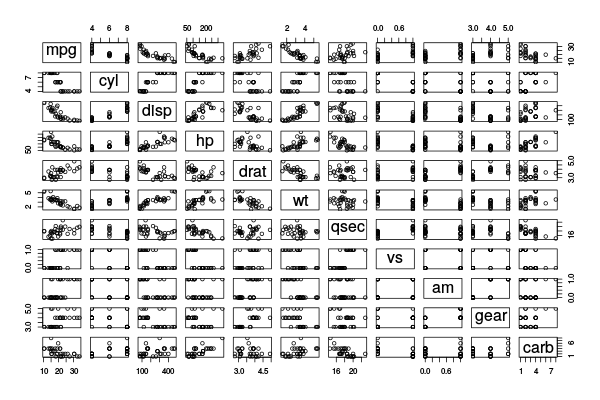
And the png file should display as such directly in your emacs… You
can also obviously replace the emacs black magic
((org-babel-temp-file....)) by a simple /tmp/foo.png if you want
to give this output a name that you can later reuse…
- Many other cool things. First read this for an introduction to org-mode! Then read the init.org you just downloaded to learn about other shortcuts ;).
I hope this helps and do not hesitate to write me back if you find way to improve these tips.